Super Spin Mobile App and PWA
 Available in GB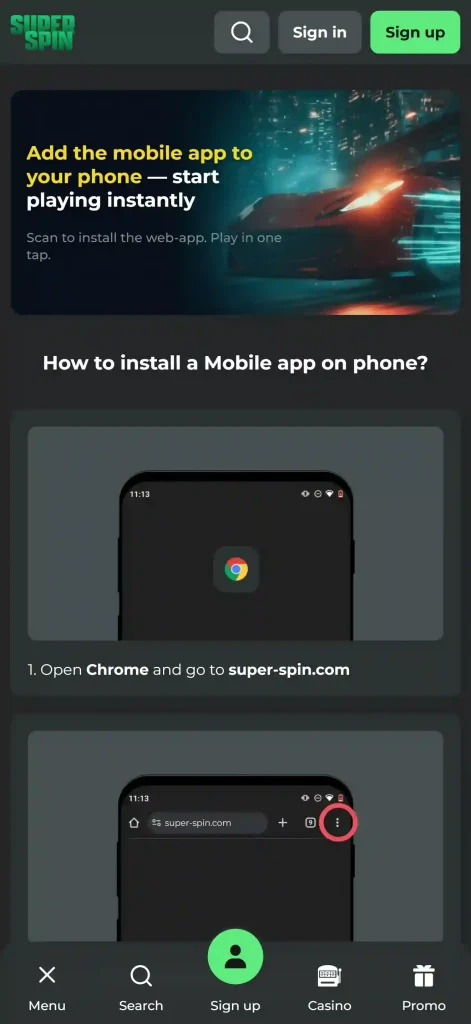
iPhone, Android and home-screen access
Super Spin’s documented mobile flow is an installable web-app or PWA-style experience rather than a native-store app. The official mobile page has separate iOS and Android tabs and gives iPhone users a Safari-based Add to Home Screen process. That creates a home-screen icon while keeping the casino tied to the web experience.
The same official page also surfaces 24/7 live chat and payment logos including Apple Pay, Google Pay, SEPA, cards and bank transfer. Super Spin’s current casino lobby includes slots and live casino, so the practical mobile question is how comfortably those browser-based features work on your phone, not whether a native app badge exists.
Table of Contents
- Super Spin mobile format at a glance
- The official Super Spin app page describes a home-screen install
- How to add Super Spin to an iPhone home screen
- Android is part of the official mobile flow without a confirmed Play Store listing
- Slots and live casino remain the main mobile content
- Mobile payments include phone-friendly options in the published payment set
- Live chat is available from the same mobile-facing site
- PWA versus native app: what actually changes for the user
- What to test before making mobile your main way to play
- Web-app access changes how installation and updates should be understood
- Test the mobile journey as one sequence from login to play
- Why Super Spin's PWA matters more than a native app for mobile users
Super Spin mobile format at a glance
The official Super Spin app page describes a home-screen install
The current Super Spin mobile page is headed “How to install a Mobile app on phone?” and presents iOS and Android as selectable options. On iOS, the visible instructions tell the user to open the site in Safari, tap the Share button, choose Add to Home Screen, then name the icon and tap Add.
That is the behaviour normally associated with an installable web app or PWA-style shortcut. It is materially different from downloading a native binary from Apple’s App Store or Google Play. The documented flow is PWA-style access; the official page does not establish a native App Store or Google Play listing.
Official source: Super Spin mobile application page.
How to add Super Spin to an iPhone home screen
- Open the official Super Spin site in Safari.
- Use Safari’s Share control.
- Select Add to Home Screen.
- Choose the icon name and tap Add.
These are the steps shown on the official mobile page. Once added, the icon provides faster access from the home screen, but the underlying experience remains web-based. A user should still expect site updates, sign-in state and connectivity to behave more like a browser service than a conventional offline-capable native game app.
The official installation instructions are the useful reference point because they show a browser-to-home-screen flow rather than a store download.
Android is part of the official mobile flow without a confirmed Play Store listing
The official page visibly includes an Android tab alongside iOS. That supports describing Android as part of Super Spin’s mobile installation flow. The official page shows Android as part of the installation flow but does not provide enough visible detail for a reliable step-by-step Android sequence.
On Android, the practical approach is to open the official mobile page and follow the currently displayed Android instructions for the browser and device in use. Browser interfaces can differ between Chrome-based variants and manufacturer software, so copying an unsupported generic sequence would be less accurate than directing users to the live instructions.
Slots and live casino remain the main mobile content
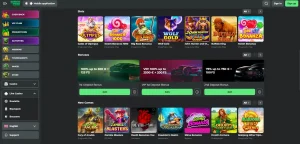
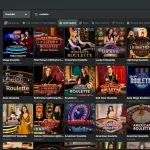
Super Spin’s current casino lobby has dedicated slots and Live Casino navigation, with live categories for roulette, blackjack and baccarat. That means the mobile experience needs to support both tap-driven slot interfaces and video-heavy live tables.
For slots, the useful checks are search, category navigation, portrait usability and whether controls remain comfortably spaced. For live dealer games, screen size matters more because the video feed, betting controls and table information all compete for space. The games on mobile page covers the wider provider mix, while live casino on mobile covers Evolution and Pragmatic Play Live examples.
Mobile payments include phone-friendly options in the published payment set
The verified Super Spin payment set includes cards, bank transfer/SEPA, Apple Pay and Google Pay. The official app page itself displays Apple Pay, Google Pay, SEPA, card and bank-transfer logos in its footer, reinforcing that those methods are part of the published mobile-facing environment.
That does not mean every payment method will be available to every account or transaction. Check whether the method you plan to use appears when you are signed in and whether its deposit or withdrawal rules suit your needs. For GBP limits and the broader funding picture, see mobile payments.
Live chat is available from the same mobile-facing site
The official mobile page states “Live chat 24/7” in its footer. That is useful for a phone-first user because support can be reached without switching to a separate desktop-only channel. Multiple independent sources also support the published 24/7 live-chat availability.
The published 24/7 availability does not guarantee response quality or resolution times. If a transaction or verification issue arises, keep screen captures and reference numbers where available so the conversation can be followed up consistently.
PWA versus native app: what actually changes for the user
| Question | Super Spin’s documented flow | Practical implication |
|---|---|---|
| How is it installed? | From the website to the home screen | No native-store download is required by the documented iOS flow |
| Where do updates come from? | From the web service | Users normally see the current site version when they reopen it |
| Does this prove an App Store or Play Store listing? | No | No native-store listing is established by the official page |
| Does it still feel app-like? | It can launch from a home-screen icon | Convenient access without changing the underlying web model |
This distinction matters because casino reviews often use “app” as a loose synonym for any mobile access. The official mobile information is more specific: Super Spin provides a mobile application page with an install-to-home-screen flow. Calling that a PWA-style experience is more informative than implying a native store package that has not been verified.
What to test before making mobile your main way to play
Interface checks
- Open the lobby and test search and game categories.
- Launch one slot and one live table you actually use.
- Check portrait and landscape behaviour where supported.
- Confirm that login and live chat remain easy to reach.
Account checks
- Confirm your preferred payment method is visible after login.
- Read transaction limits before depositing.
- Keep the official site bookmarked in case the home-screen icon is removed.
- Avoid installing lookalike packages from unverified third-party download pages.
The Super Spin review combines the mobile picture with bonuses, payments, games, trust and account information for a broader decision.
Web-app access changes how installation and updates should be understood
A home-screen web app is primarily a shortcut into the live web service. The icon can make access feel app-like, but the underlying content still comes from the website rather than from a separately documented native-store package. That distinction matters when a user is deciding what “install” means: adding the icon improves access, while the casino itself remains tied to browser-era account sessions, connectivity and site updates.
It also means there is no need to infer features that the official page does not describe. A native listing can have its own store version history, device requirements and platform permissions. The current Super Spin material instead supports the browser-to-home-screen route. The safest description is therefore the one the official flow demonstrates, without adding claims about store distribution, biometric login or offline behaviour.
Test the mobile journey as one sequence from login to play
The useful mobile test is not limited to whether the home page opens. A regular user moves through several stages: opening the site or home-screen icon, signing in, finding a game, using the live or slots interface, reaching support when needed and checking the cashier. Super Spin publishes mobile-facing access to casino content, live chat and payment methods, so those stages can be assessed together on the same device.
For iPhone users, the documented Safari Add to Home Screen process provides the clearest installation path. For Android, the official page confirms an Android route but the visible material does not support inventing a universal browser menu sequence. In both cases, the current instructions on the official mobile page should take priority over a generic tutorial that may not match the device or browser version.
The same principle applies to mobile payments and live casino. The presence of Apple Pay, Google Pay, cards, bank transfer and SEPA in the published set shows the payment categories associated with the service, while the signed-in cashier determines what is actually offered to that account. Live tables should likewise be tested in the exact interface used on the phone rather than assumed to behave identically to desktop.
Why Super Spin’s PWA matters more than a native app for mobile users
For Super Spin, the documented mobile offer is straightforward: the official site supports a phone-focused install flow, including clear iOS Add to Home Screen instructions and an Android option, while the same environment connects to the casino lobby, 24/7 live chat and published mobile-friendly payment methods.
The useful distinction is therefore not “app versus no app”. It is documented PWA-style access versus an unverified native-store listing. For users who mainly want a quick home-screen route into slots, live casino, payments and support, the documented web-app flow answers that need without depending on features or store availability that are not established by the official page.